API & MCP included on every plan
Schedule Your LinkedIn Short Video Updates
Schedule short LinkedIn video updates to your profile or Company Page. Upload concise clips, write professional captions, and publish automatically on a clear calendar.
Relied on by B2B marketers, founders, and HR teams using short video updates to keep their LinkedIn presence active
Post to LinkedIn through one unified social media API for your apps, AI agents, and automation tools. Use the WoopSocial REST API or MCP server to automate posting — we handle OAuth, tokens, and platform changes so you can ship features.
One API for posting
Publish to LinkedIn through a single unified social media API — no separate integrations per platform
Short Video Scheduling
Upload concise video clips to your LinkedIn profile or Company Page, write professional captions, and assign a publishing time. For longer pieces you can also schedule LinkedIn video posts. schedule LinkedIn video posts
- Short clip support
- Caption and hashtag fields
- Calendar-based scheduling
Profile and Page Coordination
Decide whether a short video should live on an executive profile, a Company Page, or both, then keep timing aligned from a single dashboard.
- Profile vs Page routing
- Clear audience targeting
- Consistent messaging
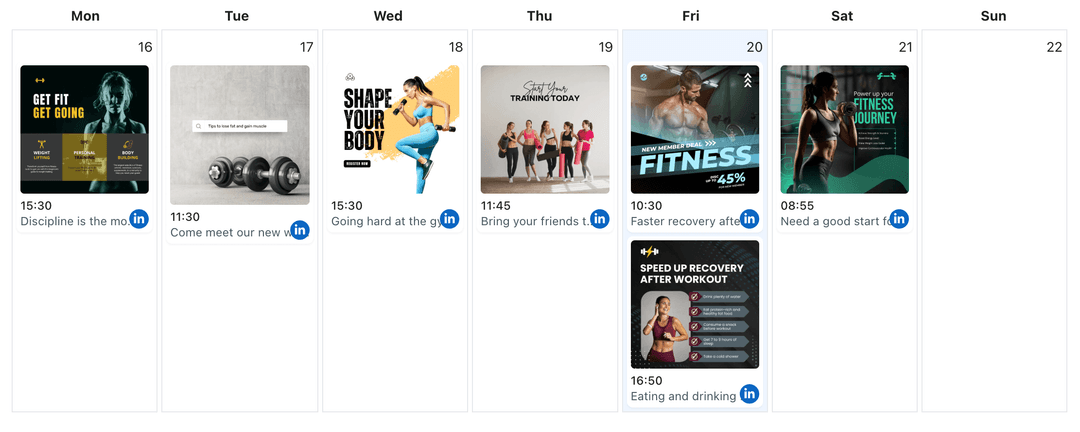
Calendar View for Short Updates
See short video updates alongside image posts and document carousels so you can avoid crowding big announcements on the same day.
- Week and month views
- Gap and overlap detection
- Drag-to-adjust timing
How It Works
Get your free API key
Sign up in under 70 seconds, connect your LinkedIn account, and start calling the unified API or MCP server.
Build your integration
Send posts from your app, workflow, or AI agent with one endpoint — no separate platform SDKs to maintain.
Publish automatically
Schedule or publish LinkedIn content instantly. WoopSocial handles OAuth, tokens, and platform API changes.
Campaign-Friendly Short Clips
Use short videos to highlight milestones, promote webinars, or reinforce product launches without needing a full-length announcement every time.
Professional Caption Support
Keep captions concise but complete, using saved talking points and disclaimers where needed so every short video still meets your brand and compliance standards.
Time-Zone Aware Scheduling
Schedule short updates to match business hours in specific regions so your video content appears when local teams and prospects are most active.
Why Short Video Updates Work on LinkedIn
Not every announcement needs a full webinar recap or long-form video. Short, focused clips help you share outcomes, product highlights, or culture moments quickly while keeping your LinkedIn presence active between larger content drops.
By scheduling these short videos, you make sure they appear alongside the right campaigns instead of getting lost during busy internal weeks or travel days.
Keep Short Clips in Step with Longer Assets
Short videos often point toward deeper resources: a full demo, a whitepaper, or a long-form update. Seeing them in the same calendar as those assets makes it easy to space content so your network has time to engage with each piece.
When a short clip earns strong engagement, you can follow up with an image post or carousel on another day that explores the same topic in more detail for decision-makers who want more context. schedule LinkedIn image posts.
Ready to build your LinkedIn integration?
Line up concise professional clips for your profile or Company Page and keep LinkedIn audiences informed without rushing last-minute uploads.
Get your free API keyFrequently Asked Questions
Yes. You can upload shorter clips, add captions, and schedule them like any other LinkedIn video so quick updates publish on time.
LinkedIn short videos are supported on the free plan with unlimited posts on supported networks. Pro adds more connected accounts.
You select the destination when scheduling. WoopSocial then publishes the short video only to that profile or Page at the time you choose.
You can update the video file, adjust captions, or move the time slot any time before the LinkedIn short video publishes.
No. Once your short video updates are scheduled, WoopSocial handles publishing, so you can stay focused on other work.
Keep LinkedIn Short Video Updates On Schedule
Batch short clips, assign them to the right profiles and Pages, and publish automatically with WoopSocial’s LinkedIn workflow.
Get your free API key