API & MCP included on every plan
Post at the Best Time on LinkedIn
Schedule LinkedIn posts at optimal times for your professional network. Plan your posting schedule and publish automatically when your connections are most active.
Trusted by developers, agencies, and product teams building on the unified WoopSocial API
Post to LinkedIn through one unified social media API for your apps, AI agents, and automation tools. Use the WoopSocial REST API or MCP server to automate posting — we handle OAuth, tokens, and platform changes so you can ship features.
One API for posting
Publish to LinkedIn through a single unified social media API — no separate integrations per platform
Professional Time Scheduling
Choose any date and time for your LinkedIn profile or Company Page posts. Schedule content for workday hours when your professional network engages most. For visual content, you can also schedule LinkedIn image posts at your preferred times. schedule LinkedIn image posts
- Any time selection
- Date and time control
- Automatic publishing
Network Engagement Planning
Plan your entire LinkedIn content calendar in advance. Schedule posts for optimal engagement windows during work hours and maintain consistent posting without daily interruptions.
- Week and month planning
- Consistent scheduling
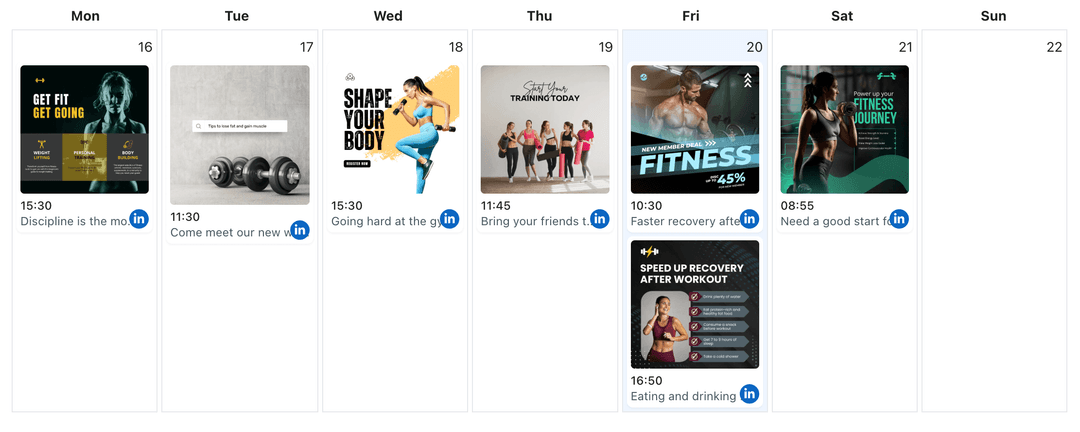
- Visual calendar view
Automatic LinkedIn Publishing
Set your posting times once and let WoopSocial handle delivery. Your LinkedIn posts publish automatically at the scheduled times, even when you are offline or in meetings.
- Automatic posting
- No manual intervention
- Timezone support
How It Works
Get your free API key
Sign up in under 70 seconds, connect your LinkedIn account, and start calling the unified API or MCP server.
Build your integration
Send posts from your app, workflow, or AI agent with one endpoint — no separate platform SDKs to maintain.
Publish automatically
Schedule or publish LinkedIn content instantly. WoopSocial handles OAuth, tokens, and platform API changes.
Workday Time Optimization
Schedule LinkedIn posts during business hours when your professional network is most active. WoopSocial handles time zone conversions automatically, ensuring your posts publish at the right local time for your audience.
Batch Professional Scheduling
Schedule multiple LinkedIn posts at once for different times throughout the week. Plan your entire professional content calendar in one session and maintain consistent posting schedules.
Visual Calendar Planning
See all your scheduled LinkedIn posts in a visual calendar. Identify posting gaps, adjust times, and ensure your content publishes at optimal engagement windows for your network.
Flexible Time Adjustments
Edit scheduled post times anytime before they publish. Adjust posting schedules based on campaign changes or network insights without losing your professional content.
Why Posting Time Matters for LinkedIn
LinkedIn's algorithm favors accounts that post consistently and engage their professional network. Posting at times when your connections are active increases the likelihood that your content appears in their feed. While WoopSocial does not provide analytics, you can use LinkedIn's native analytics to identify when your network is most engaged and schedule posts accordingly.
Scheduling posts for optimal times helps you maintain a consistent LinkedIn presence without interrupting your workday. Instead of posting manually throughout the day, you can plan your entire week or month in advance and let WoopSocial handle automatic publishing at the times you choose.
Consistent posting at strategic times builds network expectations. When your connections know when to expect new content, they are more likely to engage with your LinkedIn profile regularly. This approach helps you grow your professional presence and maintain active engagement with your industry network.
Finding Your Best Posting Times on LinkedIn
LinkedIn Analytics provides data about when your network is most active. Review your profile or Company Page's native analytics to identify peak engagement hours, then schedule your posts for those windows using WoopSocial. Many professionals find success posting during early morning hours, lunch breaks, and early evening times when people check LinkedIn.
Experiment with different posting times and track engagement through LinkedIn's native analytics. Once you identify patterns, schedule your content consistently at those optimal times. WoopSocial makes it easy to adjust your posting schedule as you learn more about your network's behavior.
Consider your specific professional audience when choosing posting times. B2B companies might find success during workday hours, while thought leaders may see better engagement during early mornings or evenings. Schedule your LinkedIn posts accordingly and use the visual calendar to maintain a balanced posting rhythm throughout the week.
Ready to build your LinkedIn integration?
Get your free API key and start posting in under 70 seconds. API and MCP access included on every plan, including free.
Get your free API keyFrequently Asked Questions
Yes, you can schedule LinkedIn profile or Company Page posts for any date and time you choose. Select your preferred posting times based on when your professional network is typically most active.
Use LinkedIn's native analytics to identify when your network is most engaged. Schedule your posts for those peak times using WoopSocial's calendar view.
Yes, WoopSocial automatically publishes your scheduled LinkedIn posts at the specified date and time. You do not need to be online when they go live.
Yes, you can edit the posting time for any scheduled LinkedIn post before it publishes. Simply update the date and time in your calendar view.
WoopSocial does not provide analytics or best time suggestions. You can use LinkedIn's native analytics to identify optimal posting times and schedule accordingly.
WoopSocial supports time zone settings, allowing you to schedule LinkedIn posts in your preferred time zone for accurate publishing times.
Free plan includes unlimited posts on supported networks. Pro plan users can schedule unlimited LinkedIn posts at any times they choose.
Start Posting at the Best Time Today
Schedule your LinkedIn posts for optimal engagement windows and publish automatically with WoopSocial.
Get your free API key