API & MCP included on every plan
Cross-Post Your LinkedIn Content to TikTok
Cross-post your LinkedIn videos, thought leadership clips, and professional visuals to TikTok. Adapt professional stories for short-form viewing and keep both audiences active.
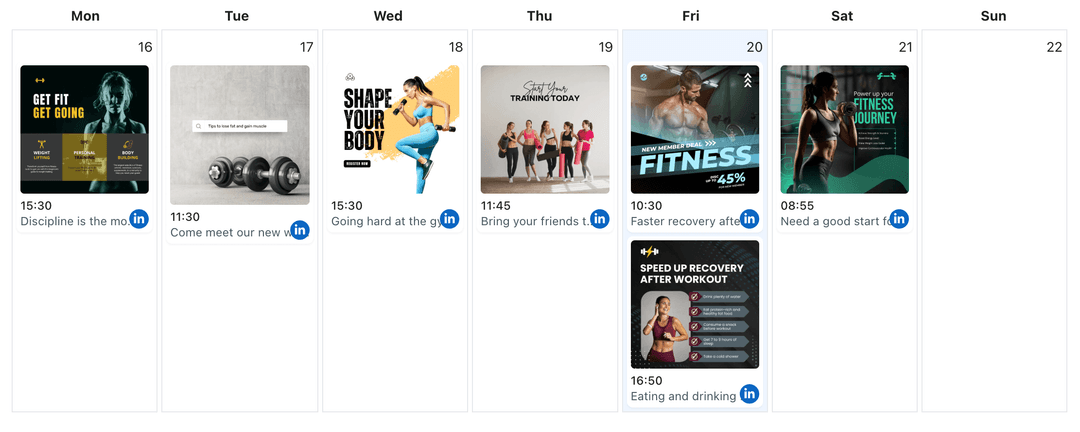
Trusted by professionals sharing LinkedIn insights on TikTok
Post to LinkedIn through one unified social media API for your apps, AI agents, and automation tools. Use the WoopSocial REST API or MCP server to automate posting — we handle OAuth, tokens, and platform changes so you can ship features.
One API for posting
Publish to LinkedIn through a single unified social media API — no separate integrations per platform
LinkedIn to TikTok Cross-Posting
Pick LinkedIn videos or recorded snippets and route them to TikTok with refreshed captions. Keep professional context while making the opening seconds hook TikTok viewers. For LinkedIn scheduling alone, you can also schedule LinkedIn video posts directly. schedule LinkedIn video posts
- Select professional clips
- Refresh TikTok captions
- Schedule short drops
Professional Story Adaptation
Convert longer insights into concise TikTok points. Lead with the takeaway, keep jargon light, and maintain a clear professional angle that fits short-form viewing.
- Lead with the takeaway
- Keep tone professional
- Stay concise
Calendar Coordination
Plan LinkedIn and TikTok publishing in one view. Space out leadership posts, schedule TikTok clips, and avoid overlapping drops. When mapping campaigns, you can also use the LinkedIn content planner to organize posts. LinkedIn content planner
- One scheduling view
- Avoid overlap
- Plan campaigns
How It Works
Get your free API key
Sign up in under 70 seconds, connect your LinkedIn account, and start calling the unified API or MCP server.
Build your integration
Send posts from your app, workflow, or AI agent with one endpoint — no separate platform SDKs to maintain.
Publish automatically
Schedule or publish LinkedIn content instantly. WoopSocial handles OAuth, tokens, and platform API changes.
Short-Form Professional Hooks
Craft opening lines that deliver the value fast. Keep titles clear, add concise context, and make sure the first seconds match the TikTok audience you want to reach.
Context Preservation
Maintain professional credibility by pairing concise captions with the clip's main takeaway. Keep calls to action aligned with your LinkedIn positioning.
Multi-Page Flexibility
Switch between LinkedIn personal profiles and Company Pages while posting to one TikTok account. Choose the right voice for each clip without reauthorizing.
Coordinated Timing
Schedule LinkedIn posts and TikTok clips with clear spacing. Keep LinkedIn audiences informed and TikTok viewers engaged without flooding either feed.
Why Cross-Post LinkedIn Content to TikTok?
Short professional tips, quick product walk-throughs, and leadership soundbites resonate on TikTok when the message is distilled. Cross-posting lets you reuse LinkedIn videos, keep authority, and tap TikTok's reach without creating a second content pipeline.
By trimming to the core point and adjusting captions, you deliver the same expertise to two audiences. LinkedIn keeps the full context, while TikTok receives the concise highlight that fits its fast scroll.
Best Practices for LinkedIn to TikTok
Lead with the outcome or lesson first. Keep visuals clean, minimize slides, and let the speaker carry the story within seconds.
Plan cadence that respects both channels. Use the calendar to alternate deeper LinkedIn posts with short TikTok clips so each audience gets the format they prefer.
Ready to build your LinkedIn integration?
Reuse LinkedIn videos and leadership clips on TikTok while keeping your professional presence consistent.
Cross-post to TikTokFrequently Asked Questions
Yes. Connect both accounts, select the LinkedIn video you want to reuse, trim it for vertical viewing, and schedule it for TikTok.
You can rewrite captions for TikTok while keeping tone and clarity. Keep hooks short and the key takeaway upfront.
Yes. TikTok cross-posting requires a Business account. Connect it once and manage permissions anytime.
Yes. Choose whether you are pulling content from a personal profile or Company Page, then route it to the same TikTok account.
Yes. Cross-posts count toward your monthly limit. Free plan includes unlimited posts on supported networks.
Yes. Keep LinkedIn publishing at one cadence and choose separate times for TikTok while managing both calendars together.
Yes. Switch between profiles or Pages and keep one TikTok connection active without repeated logins.
Share Your Expertise on TikTok
Deliver LinkedIn insights in TikTok-friendly clips, grow reach, and keep scheduling simple in one dashboard.
Get your free API key