API & MCP included on every plan
Create Facebook Images with AI
Generate on-brand Facebook Page images with AI. Turn prompts into feed-ready visuals, add captions, and schedule posts from one simple WoopSocial calendar.
Trusted by Facebook Page managers who need fresh visuals without hiring a full-time designer
Post to Facebook through one unified social media API for your apps, AI agents, and automation tools. Use the WoopSocial REST API or MCP server to automate posting — we handle OAuth, tokens, and platform changes so you can ship features.
One API for posting
Publish to Facebook through a single unified social media API — no separate integrations per platform
AI Images for Facebook Posts
Give AI a quick brief- product, event, or offer- and receive Facebook-friendly images you can refine. When you are ready to publish, you can also schedule Facebook image posts from the same calendar. schedule Facebook image posts
- Feed-friendly sizing
- Style and brand cues
- Editable results
Caption and Visual Pairing
Generate matching captions for each AI image so your visuals and text tell the same story. If you manage several Pages, you can reuse approved copy across accounts with the Page switcher. manage multiple Facebook Pages
- Aligned messaging
- Reuse across Pages
- Fast approvals
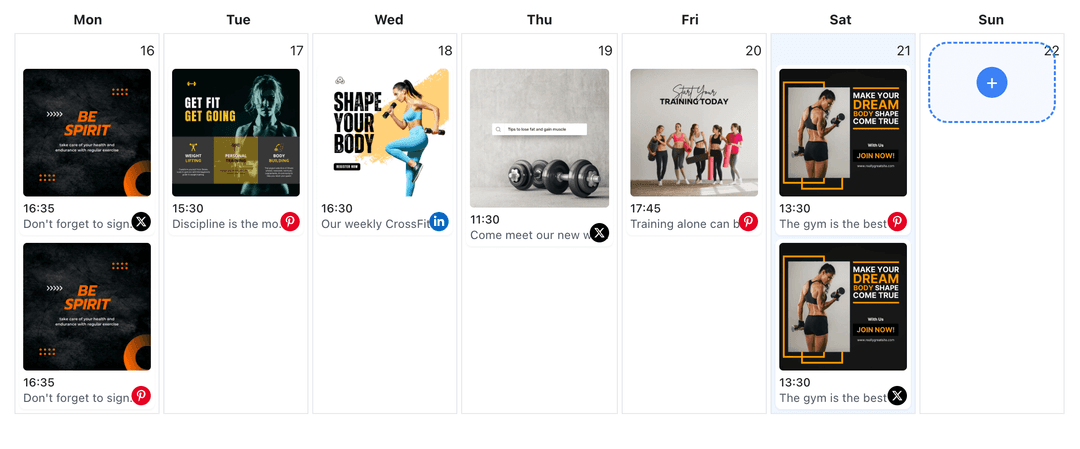
Plan Images on a Calendar
Drop AI-created images straight into your Facebook content planner, choose dates and times, and keep promotions spaced out for a balanced feed. Facebook content planner
- Visual calendar
- Drag-to-reschedule
- Gap detection
How It Works
Get your free API key
Sign up in under 70 seconds, connect your Facebook account, and start calling the unified API or MCP server.
Build your integration
Send posts from your app, workflow, or AI agent with one endpoint — no separate platform SDKs to maintain.
Publish automatically
Schedule or publish Facebook content instantly. WoopSocial handles OAuth, tokens, and platform API changes.
Brand-Aligned Styles
Save preferred color palettes, logo placement notes, and tone guidance so AI-generated Facebook images stay consistent with your brand look over time.
Multiple Variations per Prompt
Request several image options from one prompt to compare layouts, backgrounds, or headline treatments before you commit to a single creative.
Caption Suggestions for Each Image
Ask AI for caption starters that match the visual’s angle- product spotlight, announcement, or community update- then edit them to fit your Page voice.
Free vs Pro Publishing Limits
Generate as many drafts as you like. Free plan includes unlimited posts on supported networks with up to 2 connected social accounts; upgrade to Pro when you need more accounts.
Why Generate Facebook Images with AI?
Fresh visuals keep your Facebook Page discoverable, but designing every asset from scratch is tough when you are also running campaigns. AI image generation removes the time sink of starting with a blank canvas, giving you platform-sized graphics that are ready for captions and scheduling.
You still control the outcome. Keep the variations you like, discard what does not match your brand, and add human edits before anything goes live. The result is faster production without sacrificing accuracy or voice.
Keep Your Facebook Feed Balanced
Use AI images to fill gaps between video posts, Stories, or link shares so your feed always has something new to show. Spread visuals across promotions, education, and community updates to avoid repetitive messaging.
Plan everything inside the Facebook content planner, adjust timing with drag-and-drop, and make sure each AI-generated image supports a clear campaign goal or call to action. organize posts in the Facebook content planner.
Ready to build your Facebook integration?
Generate Facebook-ready visuals from simple prompts, pair them with captions, and schedule posts without leaving WoopSocial.
Create Facebook images with AIFrequently Asked Questions
AI can generate feed-ready visuals for promos, announcements, tips, and product highlights. You edit every output before scheduling it to your Page.
Yes. Include brand colors, mood, and layout notes in your prompt. Save presets so future Facebook images follow the same style.
Generate captions alongside your images, then choose the best combination and schedule the post. For single-photo updates, you can also schedule Facebook image posts.
Publishing only happens after you approve the image and schedule the post. WoopSocial then publishes at the time you set.
Yes. You can generate drafts on any plan. Free users get unlimited posts on supported networks with up to 2 connected social accounts; Pro adds more accounts and credits.
No. AI speeds up first drafts. You still review every image, add brand details, and decide what goes live on your Facebook Page.
Start Creating Facebook Images with AI
Produce Facebook visuals faster, keep your Page fresh, and publish on schedule with WoopSocial’s AI-assisted workflow.
Get your free API key