API & MCP included on every plan
Schedule Your X/Twitter Short Video Posts
Schedule short X/Twitter video posts with concise tweets. Upload vertical clips, write copy within 280 characters, and publish automatically from one calendar.
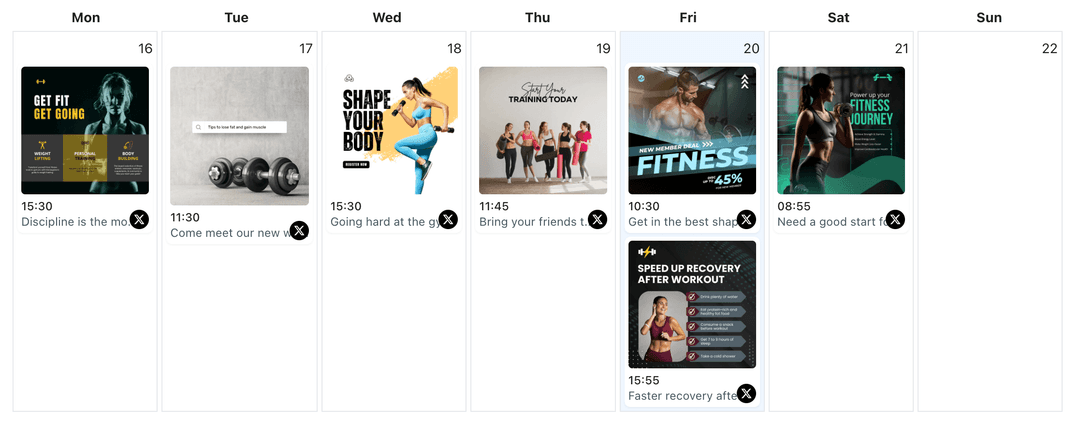
Used by founders, SaaS teams, and creators who share quick product demos and updates as short videos on X
Post to X/Twitter through one unified social media API for your apps, AI agents, and automation tools. Use the WoopSocial REST API or MCP server to automate posting — we handle OAuth, tokens, and platform changes so you can ship features.
One API for posting
Publish to X/Twitter through a single unified social media API — no separate integrations per platform
Short Video Tweet Scheduling
Upload short clips, write tweets that stay within the 280-character limit, and assign publish times so every short video lands when your followers are most likely to see it. schedule X/Twitter video posts
- Character counter support
- Native video upload
- Timezone-aware timing
Feed-Friendly Hooks
Draft hooks, CTAs, and follow-up replies in one place so a single short video post can pull viewers into a full thread when needed.
- Hook templates
- Reply copy workspace
- Saved CTA snippets
Calendar View for Short Clips
See short video tweets in your X/Twitter content calendar so you can space them around text-only updates, links, and threads.
- Week and month views
- Handle filters
- Gap spotting
How It Works
Get your free API key
Sign up in under 70 seconds, connect your X/Twitter account, and start calling the unified API or MCP server.
Build your integration
Send posts from your app, workflow, or AI agent with one endpoint — no separate platform SDKs to maintain.
Publish automatically
Schedule or publish X/Twitter content instantly. WoopSocial handles OAuth, tokens, and platform API changes.
Batch-Friendly Short Clips
Record several quick clips in one session and schedule them throughout the week so your handle never feels quiet on busy days.
Thread Support for Context
Attach optional replies to important short video tweets so interested followers can scroll into more context without leaving the platform.
Publish-Time Flexibility
Move short video tweets around in the calendar as campaigns shift, without losing the underlying media or tweet copy.
Why Short Videos Work Well on X/Twitter
Feed scrollers make decisions in seconds, and short video clips help your message stand out more than text alone. Scheduling those posts ensures that product demos, feature teases, and quick explainers drop at the right times instead of whenever you remember to tweet.
Over time, a steady cadence of short video posts builds familiarity with your product and point of view, especially when they reinforce the same themes as your text threads and link posts.
Mix Short Clips with Other Tweet Formats
Short videos do not replace threads, images, or link posts- they support them. By planning them in the same calendar, you can avoid stacking multiple heavy updates in the same hour and keep a natural rhythm in your feed.
When a short video gets strong engagement, you can quote-tweet it later with a link or thread reply that takes the topic deeper without overwhelming followers on day one. schedule X/Twitter image posts.
Ready to build your X/Twitter integration?
Keep short clips, tweet copy, and publish times organized in one calendar so your handle stays active even when your day is packed.
Get your free API keyFrequently Asked Questions
Yes. Upload your short video clips, write the tweet text, and schedule everything from the WoopSocial calendar for automatic publishing.
X/Twitter short videos are supported on the free plan with unlimited posts on supported networks. Pro adds more connected accounts.
You can draft and schedule replies that will publish along with or shortly after the main short video tweet to add context.
Yes. You can update the media, change the tweet text, or move the scheduled time any time before WoopSocial publishes the tweet.
No. Once scheduled, WoopSocial posts your short video tweet at the right time, even if you are offline.
Keep X/Twitter Short Videos On Schedule
Batch short clips, attach strong hooks, and publish on time with WoopSocial’s simple calendar for X.
Get your free API key