API & MCP included on every plan
Cross-Post Your X/Twitter Content to Instagram
Cross-post your X/Twitter threads, images, and short clips to Instagram. Turn visual tweets into feed posts or carousels and schedule both platforms from one calendar.
Trusted by brands bringing Twitter highlights to Instagram followers
Post to X/Twitter through one unified social media API for your apps, AI agents, and automation tools. Use the WoopSocial REST API or MCP server to automate posting — we handle OAuth, tokens, and platform changes so you can ship features.
One API for posting
Publish to X/Twitter through a single unified social media API — no separate integrations per platform
Twitter to Instagram Cross-Posting
Select image-led tweets or short clips, keep the core visual, and adapt the caption for Instagram. For new Twitter content, you can also schedule X/Twitter video posts directly. schedule X/Twitter video posts
- Pick visual tweets
- Refresh captions
- Schedule both feeds
Thread to Carousel
Bundle key points from a thread into an Instagram carousel. Choose the best lines, pair them with graphics, and keep the sequence short enough for swipes.
- Select highlights
- Limit slide count
- Keep hooks clear
Calendar Coordination
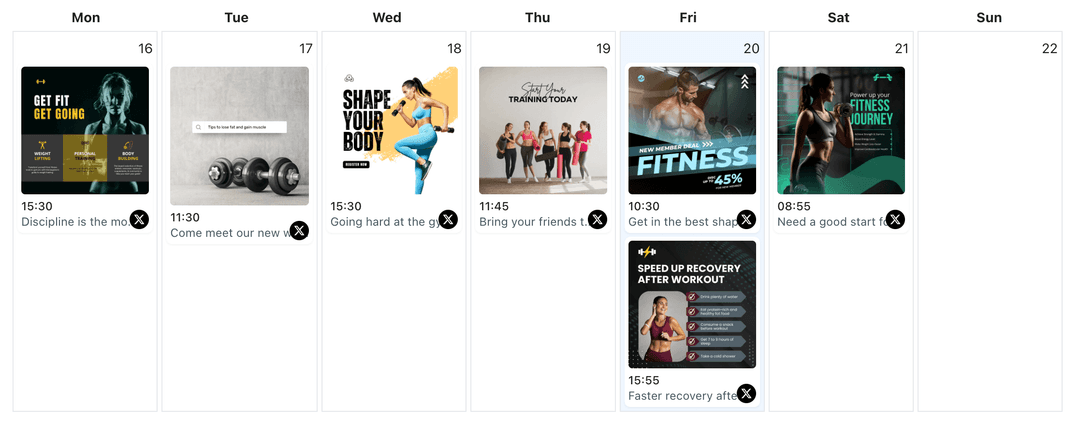
View Twitter posts and Instagram drops together. Avoid announcing the same update twice in one day and plan campaigns with the Twitter content planner when needed. X/Twitter content planner
- Unified schedule
- Prevent overlap
- Campaign clarity
How It Works
Get your free API key
Sign up in under 70 seconds, connect your X/Twitter account, and start calling the unified API or MCP server.
Build your integration
Send posts from your app, workflow, or AI agent with one endpoint — no separate platform SDKs to maintain.
Publish automatically
Schedule or publish X/Twitter content instantly. WoopSocial handles OAuth, tokens, and platform API changes.
Caption Conversion
Expand beyond 280 characters when you move to Instagram. Lead with the key takeaway, keep hashtags minimal, and remove URLs that clutter the caption.
Visual Formatting
Refine screenshots or graphics from tweets so they look polished in square or vertical layouts. Keep text legible and centered for the Instagram feed.
Thread Summaries
Turn long threads into concise carousels. Pick the strongest lines, pair them with supporting visuals, and keep the flow easy to swipe.
Schedule Spacing
Use the shared calendar to stagger announcements. Move a post when two platforms would otherwise hit followers at the same moment.
Why Cross-Post Twitter Content to Instagram?
Your best tweets already prove what resonates. Reframing them for Instagram extends that reach to a visual-first audience while keeping messaging consistent across platforms.
Cross-posting also protects your schedule. You can stagger launches, keep campaigns visible longer, and avoid repeating the same update on the same day.
Best Practices for Twitter to Instagram
Start with tweets that pair well with imagery. Use a clean graphic, limit hashtags, and keep the hook in the first line of the caption.
For threads, choose 4-7 slides that carry the story. Make the first slide the promise, keep follow-ups short, and end with a clear takeaway instead of a link.
Ready to build your X/Twitter integration?
Repurpose your strongest tweets for Instagram, keep feeds aligned, and publish from one calendar.
Cross-post to InstagramFrequently Asked Questions
Yes. Choose the tweet, keep the image, adapt the caption, and schedule it for Instagram alongside your Twitter plan.
Select the key lines, pair them with visuals, order the slides, and schedule the carousel. You decide how many slides to include.
No. Each platform keeps its own timing. You can stagger posts to avoid repeating the same message simultaneously.
Yes. Cross-posts are supported on the free plan. Pro adds more connected accounts and removes other plan limits.
Absolutely. Keep the Twitter post untouched while tailoring the Instagram caption for length, hashtags, and tone.
Instagram Business or Creator accounts are required for scheduling. Connect once and manage permissions anytime.
Instagram captions do not support clickable links, so keep CTAs short and avoid pasting long URLs.
Share Twitter Highlights on Instagram
Turn tweets into visuals, keep brand voice consistent, and schedule both feeds without extra tools.
Get your free API key