API & MCP included on every plan
Schedule Your Pinterest Short Video Pins
Schedule short vertical video Pins to your Pinterest boards. Upload clips, write keyword-rich descriptions, and publish automatically when your audience is looking for ideas.
Used by merchants, DIY creators, and bloggers who rely on short video Pins to drive saves and clicks
Post to Pinterest through one unified social media API for your apps, AI agents, and automation tools. Use the WoopSocial REST API or MCP server to automate posting — we handle OAuth, tokens, and platform changes so you can ship features.
One API for posting
Publish to Pinterest through a single unified social media API — no separate integrations per platform
Short Video Pin Scheduling
Upload short vertical clips, choose destination boards, and schedule your short video Pins alongside your static image Pins. schedule Pinterest image pins
- Vertical format guidance
- Board selection
- Automatic pinning
Keyword-Ready Descriptions
Write descriptions that stay within Pinterest recommendations while still including the search phrases your audience uses to find ideas.
- Saved keyword notes
- Human-readable copy
- Search-aware structure
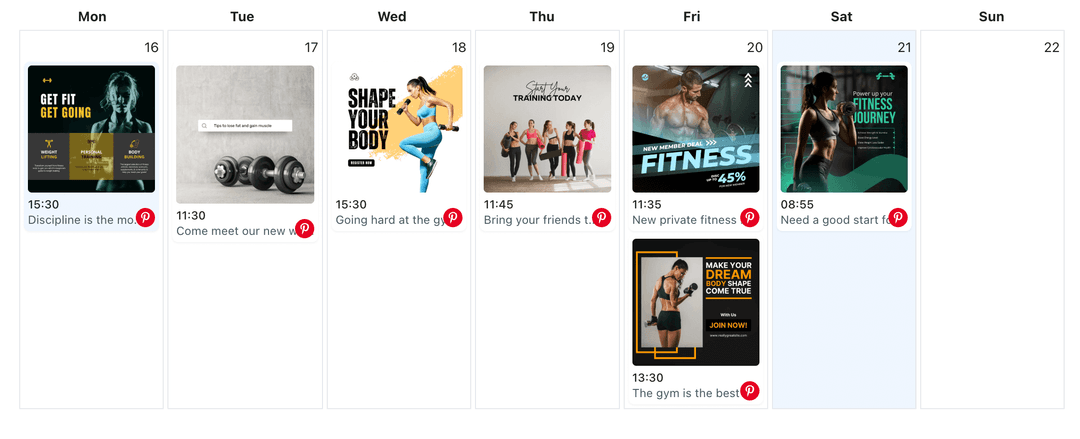
Board-Based Calendar View
See short video Pins on a calendar per board so you can spread ideas out over time instead of dropping everything on one day.
- Week and month views
- Per-board filters
- Gap spotting
How It Works
Get your free API key
Sign up in under 70 seconds, connect your Pinterest account, and start calling the unified API or MCP server.
Build your integration
Send posts from your app, workflow, or AI agent with one endpoint — no separate platform SDKs to maintain.
Publish automatically
Schedule or publish Pinterest content instantly. WoopSocial handles OAuth, tokens, and platform API changes.
Theme-Based Pin Planning
Group short video Pins by theme- seasonal, product, or tutorial- and spread them across multiple boards without losing track of where each one belongs.
Search-Friendly Copy Patterns
Reuse description structures that perform well, while still adjusting wording so each short video Pin feels unique and helpful.
Calendar for Mixed Media
Plan short video Pins next to static images so every board carries a mix of quick motion and saveable step-by-step visuals.
Why Schedule Short Video Pins on Pinterest?
Short clips stand out in Pinterest feeds by showing the finished result and a couple of key steps in seconds. Scheduling those clips helps you place them at the right moments in your seasonal calendar instead of only when you have spare time.
With a plan in place, your boards stay active with quick video ideas even during the weeks when you are focused on bigger launches or long-form content elsewhere.
Pair Short Clips with Static Pins
Short video Pins work best when they point to deeper references. By planning them next to static image Pins for the same idea, you give pinners both a fast overview and a saveable reference on the same board.
Over time, this mix of short video and static Pins helps each board feel richer, making it easier for new visitors to understand your style and catalog at a glance. schedule Pinterest image pins.
Ready to build your Pinterest integration?
Batch vertical clips, match them to the right boards, and keep your Pinterest profile active with short video Pins that publish on time.
Get your free API keyFrequently Asked Questions
Yes. You can upload a short clip once, choose one or more boards, and schedule separate Pins so each board receives content at the right moment.
Short video Pins are supported on the free plan with up to 2 connected social accounts. Pro adds more accounts and credits.
You can update the clip, adjust descriptions, or move the publish time at any point before WoopSocial pins it to your chosen boards.
Short video Pins appear right alongside your static Pins in the WoopSocial calendar so you can balance both formats on each board.
No. Once you have scheduled your short video Pins, WoopSocial handles publishing them to Pinterest at the times you selected.
Keep Pinterest Short Video Pins On Schedule
Give your short clips a real plan instead of posting them ad hoc, and let WoopSocial keep your video ideas publishing steadily.
Get your free API key