API & MCP included on every plan
Schedule Your Facebook Reels and Shorts
Schedule Facebook Reels and short video posts to your Page. Upload vertical clips, write captions, and publish automatically from one simple calendar.
Used by local businesses, creators, and social teams that rely on short-form video to stay visible in the Facebook feed
Post to Facebook through one unified social media API for your apps, AI agents, and automation tools. Use the WoopSocial REST API or MCP server to automate posting — we handle OAuth, tokens, and platform changes so you can ship features.
One API for posting
Publish to Facebook through a single unified social media API — no separate integrations per platform
Reel and Short Video Scheduling
Upload vertical clips for your Facebook Page, write captions, and choose when each reel or short video should go live. For longer content you can also schedule Facebook video posts. schedule Facebook video posts
- Vertical video support
- Caption and hashtag fields
- Clear publish times
Story-Friendly Cadence
Spread your short videos across the week so followers see a steady stream of quick updates instead of sporadic bursts.
- Even content pacing
- Day-by-day overview
- Fill empty slots fast
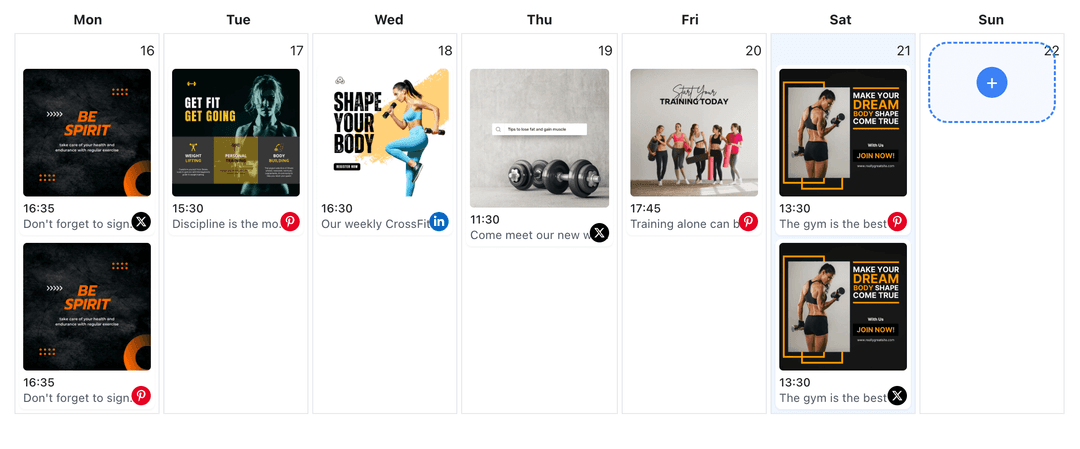
Calendar View for Shorts
See every scheduled reel or short video in a visual calendar so you can adjust timing, avoid overlaps, and keep your Page active at the best times.
- Week and month views
- Move posts by drag-and-drop
- Spot gaps in seconds
How It Works
Get your free API key
Sign up in under 70 seconds, connect your Facebook account, and start calling the unified API or MCP server.
Build your integration
Send posts from your app, workflow, or AI agent with one endpoint — no separate platform SDKs to maintain.
Publish automatically
Schedule or publish Facebook content instantly. WoopSocial handles OAuth, tokens, and platform API changes.
Batch Creation Workflow
Record several short videos in one filming session, upload them together, and assign each one to a future time so you always have something ready to post.
Short-Form Content Planning
Mix quick tips, product peeks, and behind-the-scenes clips across your calendar so short videos support bigger launches instead of competing with them.
Timing Around Peak Hours
Use what you know from Facebook Insights about when followers are active, then schedule shorts into those windows from the same workspace you use for other Page posts.
Why Schedule Facebook Reels and Short Videos?
Short vertical clips are the quickest way to stay present in the Facebook feed, but they still need structure. Scheduling your Reels and other short videos lets you map out which ideas go live on which days so you are not relying on last-minute uploads from your phone.
With a schedule in place, you can treat filming as a batch task. Capture several short clips at once, upload them into WoopSocial, and assign each one to a different day. Your Page keeps moving even when you are busy running the business.
Keep Shorts, Stories, and Posts in Sync
Reels and short videos work best when they support your broader content plan. By seeing short-form clips next to Stories and regular posts on the same calendar, you can confirm that promotions, announcements, and everyday updates all line up instead of repeating the same message three times.
When a short video deserves more context, you can pair it with a longer Facebook video post scheduled for the same week so followers who want details always know where to go next. schedule Facebook video posts.
Ready to build your Facebook integration?
Plan a week of short vertical videos in a few minutes and keep your Facebook Page active without constant manual uploads.
Get your free API keyFrequently Asked Questions
Yes. Upload your short vertical clips, add captions, and set the date and time. WoopSocial publishes them automatically to your Facebook Page.
Short videos are supported on the free plan with unlimited posts on supported networks. Pro adds more connected accounts.
You can update the video, caption, or scheduled time at any point before WoopSocial publishes the short to your Page.
Short videos appear in the same calendar as your image, video, and Story content so you can spread them out and avoid overwhelming followers on busy days.
No. Once you have scheduled your Facebook Reels and short clips, WoopSocial handles publishing even if you are offline.
Keep Facebook Reels and Shorts On Schedule
Batch your short videos, assign each one a time slot, and trust WoopSocial to publish them exactly when your audience is most likely to watch.
Get your free API key