API & MCP included on every plan
Cross-Post Your Facebook Content to Instagram
Cross-post your Facebook Page photos and carousels to Instagram without rewriting every caption. Keep branding aligned and schedule both feeds from one calendar.
Trusted by teams that keep Facebook Pages and Instagram feeds in sync
Post to Facebook through one unified social media API for your apps, AI agents, and automation tools. Use the WoopSocial REST API or MCP server to automate posting — we handle OAuth, tokens, and platform changes so you can ship features.
One API for posting
Publish to Facebook through a single unified social media API — no separate integrations per platform
Facebook to Instagram Cross-Posting
Select Page posts you want to reuse, keep the hero image, and adapt the caption for Instagram's feed. When you need fresh media, you can also schedule Facebook image posts from the same workspace. schedule Facebook image posts
- Reuse Page imagery
- Adapt captions once
- Schedule both feeds
Carousel-Friendly Workflow
Group your Facebook gallery posts into Instagram carousels without re-uploading. Keep ordering tight, trim extras, and make sure each slide supports the main story.
- Reorder slides quickly
- Keep branding aligned
- Preview carousels
Calendar Coordination
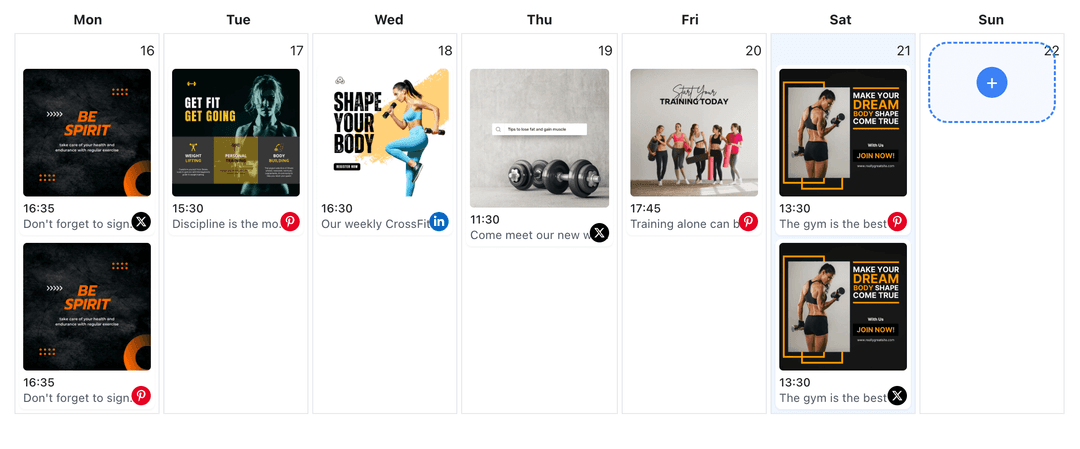
Plan Facebook Page updates and Instagram drops together. Avoid doubling announcements on the same day and line up campaigns with the Facebook content planner when you need a wider view. Facebook content planner
- One shared calendar
- Avoid overlap
- Campaign visibility
How It Works
Get your free API key
Sign up in under 70 seconds, connect your Facebook account, and start calling the unified API or MCP server.
Build your integration
Send posts from your app, workflow, or AI agent with one endpoint — no separate platform SDKs to maintain.
Publish automatically
Schedule or publish Facebook content instantly. WoopSocial handles OAuth, tokens, and platform API changes.
Caption Adaptation
Tighten Facebook copy for Instagram by front-loading the hook and keeping hashtags minimal. Maintain the same message while matching Instagram's feed style.
Carousel Assembly
Build Instagram carousels from Facebook galleries. Drag to reorder, drop slides that do not fit, and keep the cover image consistent with your campaign look.
Brand Consistency
Use the same approved assets on both platforms while tailoring tone for Instagram. Keep logos, colors, and voice aligned so audiences recognize your brand in any feed.
Scheduling Clarity
See Facebook and Instagram slots side by side. Shift a post if a launch would crowd either feed, and keep the campaign timeline balanced across channels.
Why Cross-Post Facebook Content to Instagram?
Your Facebook Page already carries visuals and copy that resonate with followers. Moving those posts to Instagram extends the same story to a new audience without creating assets twice. The result is consistent branding across both feeds and less time lost rewriting captions.
Cross-posting also protects timing. When you publish to both platforms from one calendar, you can stagger announcements, avoid redundant posts, and give each feed breathing room while staying on-message.
Best Practices for Facebook to Instagram
Lead with the image and keep captions concise. Trim long Page copy, place the hook in the first line, and keep only the hashtags that matter to the post.
When you have a gallery on Facebook, turn it into a focused carousel on Instagram. Choose the slides that tell the story fastest, align the cover image with the campaign, and schedule it when your Instagram audience is most active.
Ready to build your Facebook integration?
Repurpose approved Facebook Page posts into Instagram feed and carousel slots without rebuilding content from scratch.
Cross-post to InstagramFrequently Asked Questions
Yes. Pick any Page post with images, adapt the caption, and schedule it for your Instagram feed directly from the calendar.
You can group multiple Page images into an Instagram carousel, reorder slides, and preview the set before scheduling.
We recommend tightening Facebook copy for Instagram. Keep the hook upfront, limit hashtags, and remove links that do not belong in captions.
Yes. Cross-posts are supported on the free plan. Pro adds more connected accounts and removes other plan limits.
Yes. Set unique publish times per platform while viewing them in one calendar so you do not overload either audience.
Instagram Business or Creator accounts are required for scheduling. Connect once and manage permissions anytime.
You can still schedule Facebook image posts separately and decide which ones should also appear on Instagram from the same dashboard.
Keep Facebook and Instagram Aligned
Cross-post visuals once, schedule both feeds in one place, and stay consistent without doubling work.
Get your free API key